Dashboards
Add SimHub dashboards or any window, place them in the car and tune how they look.
A dashboard is a flat panel in the car that shows a SimHub dashboard or any window from your desktop. A preset holds up to 8 (7 while your wheel has a screen, chapter 6).
Before you start: SimHub
The app reads your dashboards from SimHub's web server.
- In SimHub, open Settings and turn on the web server. It uses port 8888.
- Keep SimHub running while you drive.
You do not need to open any SimHub dash window. The app draws the dashboard itself, in the background.
Add a dashboard
- Open a preset and choose DASHBOARDS.
- Choose ADD DASHBOARD.
- Pick one of three sources:
- FROM SIMHUB. Your dashboards are listed. Choose ADD next to one. ADDED means it is already in this preset. The refresh icon reloads the list.
- A URL. Paste a dashboard address in Paste a dashboard URL, then ADD.
- Capture a window. Pick any open window from the list.
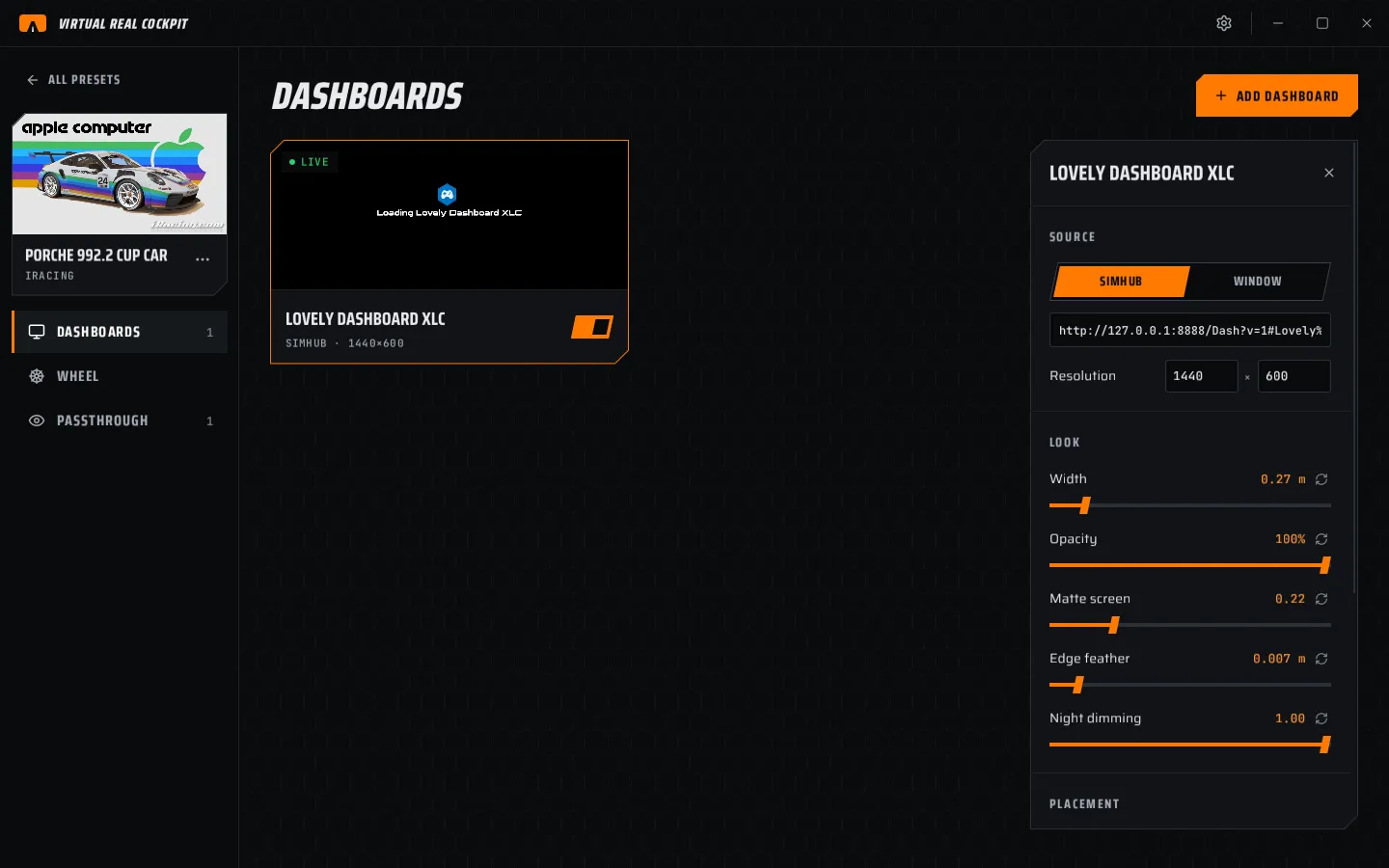
- The new dashboard is selected and the inspector opens on the right.
SimHub web server not reachable on port 8888 means SimHub is closed or its web server is off.
Dashboard cards
Each card shows a live preview, a name, the source and a switch to show or hide it.
| Badge | Meaning |
|---|---|
| LIVE | Frames are arriving. |
| WAITING | No frames yet. See chapter 12. |
| ERROR | The source failed. Hover the badge for the reason. |
Place it
Two ways:
- In VR. Choose MOVE IN VR. In the headset, point at the dashboard and hold grip to move it. Push the stick up or down to resize it, left or right to turn it.
- By numbers. Type X, Y, Z and YAW, PIT, ROL under PLACEMENT.
IN FRONT puts the dashboard in front of you. Start there, then move it onto the car's own dash.
Follow the wheel
Turn on Follow the wheel to put the dashboard on the wheel's hub. It then turns with the wheel. For a dashboard on the wheel's own screen, use the wheel screen instead (chapter 6).
Game world or real world
| Anchor | Use it for |
|---|---|
| Game world | Almost everything. The dashboard stays in the same place in the car every session. |
| Real world | Things fixed to your room that must never move when you recentre. |
Settings in the inspector
| Section | Row | What it does |
|---|---|---|
| SOURCE | SimHub / Window | Where the picture comes from. |
| Resolution | The size the dashboard is drawn at, for example 1440 × 600. Higher is sharper and costs more. | |
| LOOK | Width | Size in the car, in metres. |
| Opacity | How see-through it is. | |
| Matte screen | A soft grey veil, like a real screen. | |
| Edge feather | Soft edges, in metres. | |
| Night dimming | How much it dims when the scene gets dark. | |
| PLACEMENT | Follow the wheel, anchor, position, rotation | See above. |
| ADVANCED | Depth-sorted with the wheel | Sorts it with the wheel model, so hands and wheel can pass in front. Off: always on top and sharpest. |
| Height | Leave empty for Auto. | |
| Real world origin | Room or Local, for real-world anchors only. |
REMOVE DASHBOARD deletes it from this preset.
Window or web?
| Compared | SimHub (web) | Window |
|---|---|---|
| Needs a window on screen | No | Yes, it must stay open |
| Size | Any resolution | The window's size |
| Transparency | Yes | No |
| Looks exactly like SimHub's own window | Nearly | Yes |
Use the SimHub source unless a dashboard looks wrong in it.