The VR menu and VR controls
Open the VR menu with a controller or the wrist button, use edit mode, and recentre.
The VR menu lets you change and place everything while seated in the car, with the headset on.
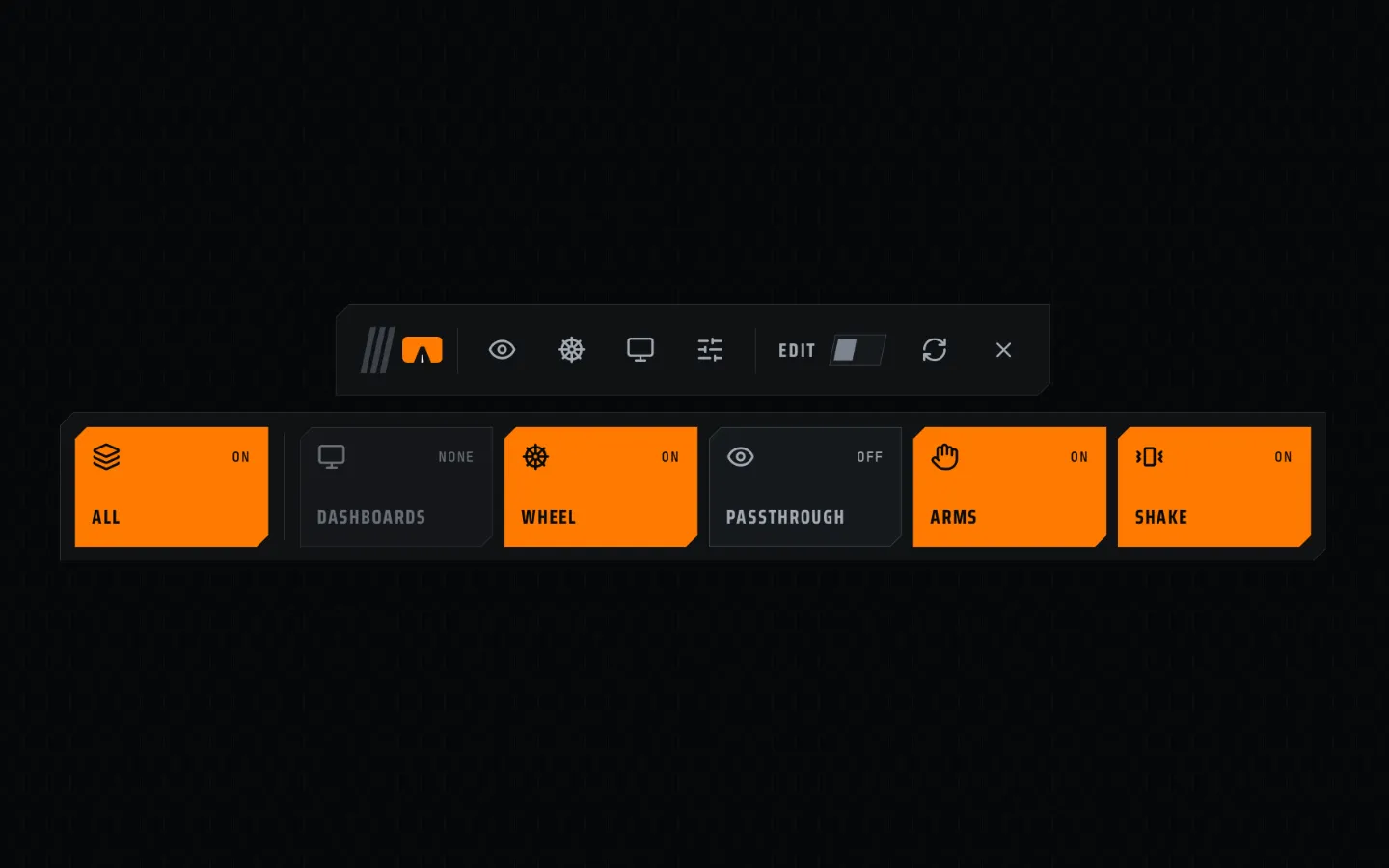
Open the VR menu
| With | Do this |
|---|---|
| Quest controllers | Press X on the left controller. |
| Valve Index | Press LEFT A. |
| Hand tracking | Hold your right index fingertip in the round button on the back of your left wrist until the ring fills (0.8 s). |
| Keyboard | F9 |
The same again closes it.
The controller's Menu button is not used. Virtual Desktop and SteamVR already use it.
The menu bar
From left to right:
- Grab handle. Hold grip on it to move the whole menu.
- Four tool windows. Passthrough, wheel, dashboards, settings. Each opens a window next to the bar.
- EDIT. Edit mode on or off.
- Recentre.
- Close.
Under the bar, the feature tiles turn features on and off for this car:
| Tile | Turns on or off |
|---|---|
| ALL | Everything. Off hides all of it; the others then read HIDDEN. |
| DASHBOARDS | All dashboards. 1 OF 2 means some are on. |
| WHEEL | The wheel model. |
| PASSTHROUGH | All canvases and boxes. |
| ARMS | Hands and arms. |
| SHAKE | Cockpit shake. |
NONE means the car has nothing of that kind yet.
Controllers
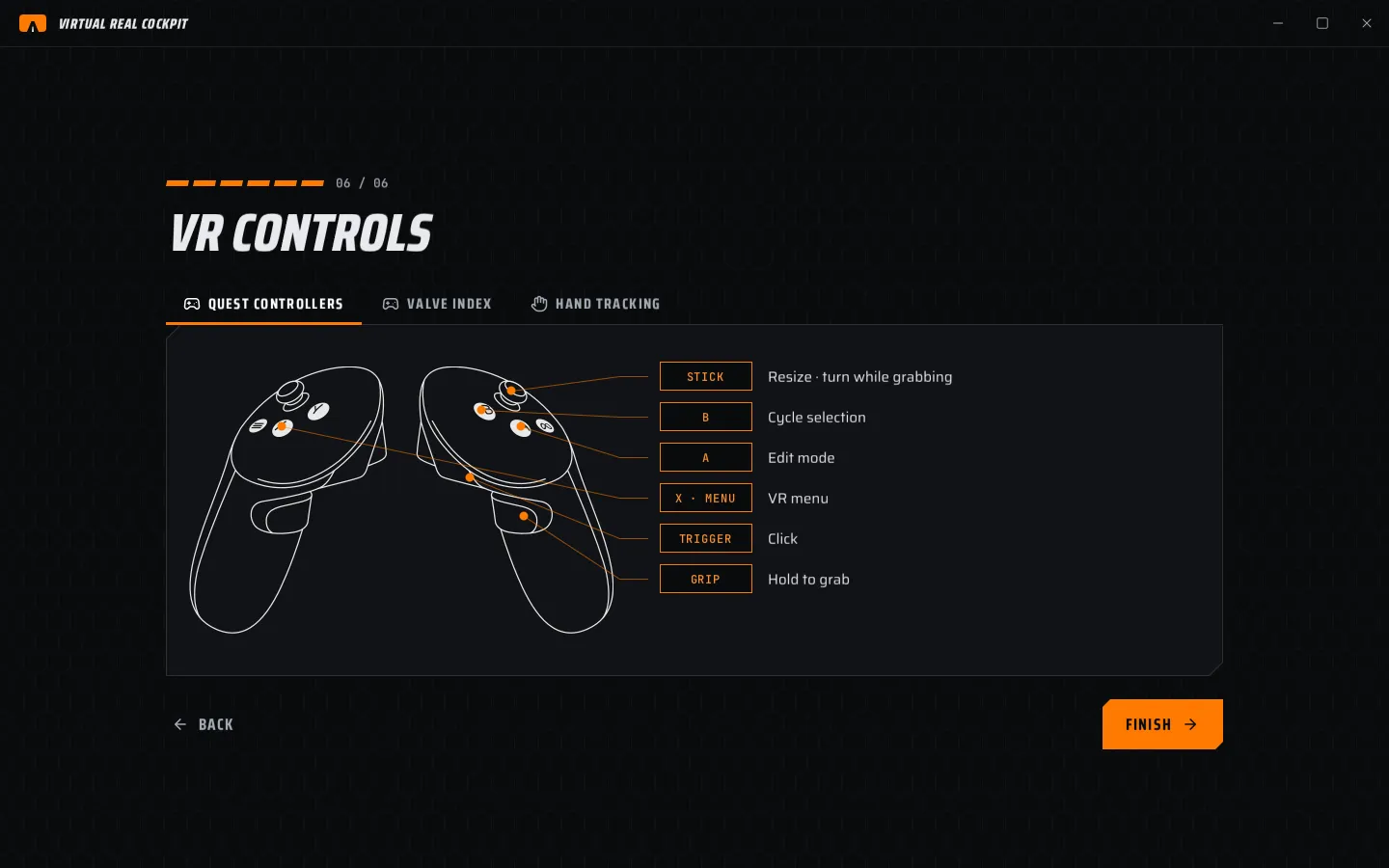
| Quest controllers | Valve Index | What it does |
|---|---|---|
| TRIGGER | TRIGGER | Click. It only ever clicks. |
| GRIP | SQUEEZE | Hold to grab: move a window, or in edit mode, an item. |
| STICK | STICK | While grabbing: up and down resizes, left and right turns. |
| A | A (right) | Edit mode (with the menu open). |
| B | B | Cycle selection. |
| X | LEFT A | VR menu. |
The Quest layout covers Quest 2, 3, 3S, Pro, Rift S and Pico 4 controllers.
Hand tracking
Turn on Settings › Controls › Hand tracking controls.
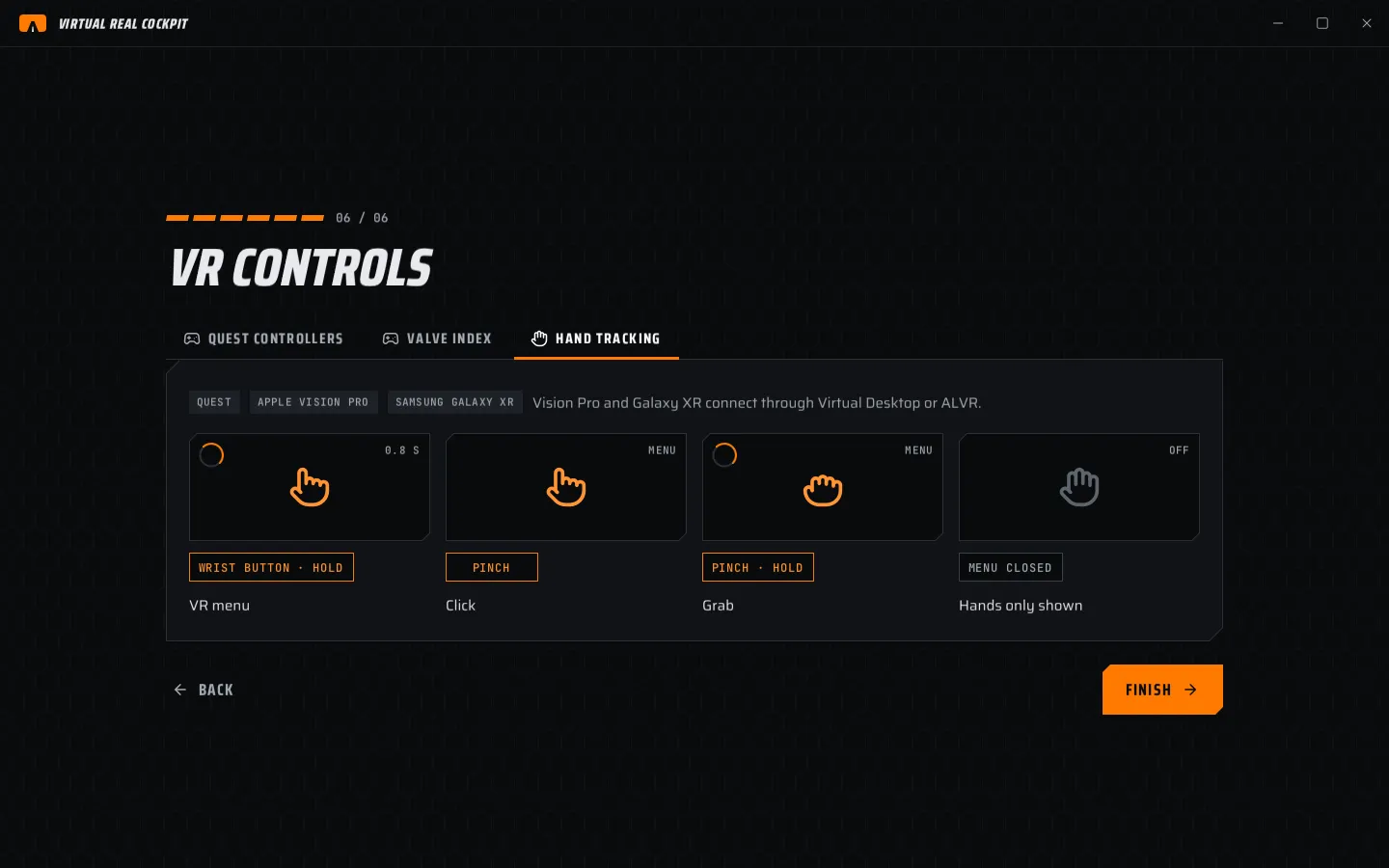
| Gesture | When | What it does |
|---|---|---|
| WRIST BUTTON · HOLD | Any time | Opens or closes the VR menu (0.8 s). |
| PINCH | Menu open | Click. |
| PINCH · HOLD | Menu open | Grab and move. |
| MENU CLOSED | Menu closed | Hands only show. No gesture does anything. |
The wrist button is dim until your finger comes near. A pinch the headset uses for itself never counts.
Nothing you do with your hands during a race can open the menu by accident: only the wrist button does.
Edit mode
Edit mode is the only time the wheel, dashboards, canvases, boxes and the hub marker can be moved. That way nothing moves by accident during a race.
- Open the VR menu.
- Flip EDIT (or press A, or F10).
- Point at an item and hold grip to move it. Push the stick to resize or turn it.
- Close the menu. Edit mode ends and everything locks.
MOVE IN VR, DRAW IN VR and ALIGN IN VR on the desktop turn edit mode on for you.
Type a value in VR
Double-click a slider (two quick trigger pulls, or two pinches) to type its value. Enter applies, Esc cancels. While you type, the keys do not reach the sim.
Recentre
Recentre moves everything placed in the game world to your current seat position.
- Your paired recentre button (chapter 2). It works only while the sim has focus.
- The recentre button on the VR menu bar.
- RECENTRE on the Wheel page.
Pair the same button as the sim's own recentre, so both happen together. The sim's own recentre cannot be seen by the app.
Keyboard keys
Settings › Controls › KEYBOARD. CHANGE sets a new key.
| Action | Default |
|---|---|
| VR menu | F9 |
| Edit mode | F10 |
| Grab selected (hold) | F11 |
| Cycle selection | F12 |
| VR click | not set |
VR controller buttons cannot be changed.